Sunday, June 15, 2008

Accelerometer based music player

hake your music with Python

ScaladoThis motion powered music player for accelerometer equipped S60 phones is probably simplest sensor based application that I have seen so far.

It provides the very basic functionality and allows you to change the music tracks with two different gestures.

Application lacks any kind of the user interface in this phase but author promised that application and interface will be improved before the official release.

This little application is created by Daniel Rocha just to show what you can do with Python for S60 and it took less than two hours to develop this minimalistic music player with sensor support.

Speaking of the functionality, shaking the phone to left advances one track in the playlist while shaking it to the right goes back one track, and putting it face down shuts down the application which is the coolest part actually ;)


Location Tagger


With Nokia Location Tagger, you can automatically tag your location data to your pictures. As you take a picture, your GPS coordinates are saved to the EXIF header of the JPEG file. You can use this data later, for example, to locate your pictures on a map.

Location tagging functionality has now been productized, and Nokia Location Tagger will not be further developed as standalone application

Download it here

Wednesday, June 4, 2008

Nokia barcode reader

I wondered many times what the Barcode application used for
and i usually try to use it but failed
and after i read this article
Google Android Will Chane your shopping Experience
i start to search about it
open your Nokia bar code reader application and try to read this

what you got
this is a way to use it
you can create you own Barcode from
Nokia Barcode generator
I'll dig a little about it and what we can use it for
for now enjoy hiding data to your friends in your signature ;)

Tuesday, April 8, 2008

Nokia Location Tagger Beta

Nokia Beta labs have churned out yet another amazing application this month ...and this time its called the "Location Tagger". Basically what this app does is that it starts off your GPS ..and gets your current or last saved co-ordinates and embeds them into the EXIF data peresnt in the JPEG pictures header.And when you upload such pictures on flickr , picasa or google earth , you will be able to see the picture in the exact position on the map you had clicked it on.

Nokia N95-1 V21 Firmware Out

Here's the changelog :

New features
* Flash Lite 3 support added
* Widget (Web runtime) support added
* Default year changed to 2008

Improvements
* General stability improvements.
* Pre-defined access point kept after switching to different type SIM card.
* Localization improvements.
* Standby time improvements.
* Improvements to BT headset interoperability.
* Improvement to Calendar data restoring.
* Switch from landscape to portrait mode & screen rotations improvements.

Browser
* Improvement to long text writing to web page text boxes.
* Browsing from WLAN wizard improvement.

Media Player
* Localizations improvements in Music player.
* Windows Media Player recognizes device as Nokia N95.

Gallery
* Image rotation improvement in album view.
* Gallery & Slideshow performance improvements.

Messaging
* Improvement to SMS reception.

Java
* Midlet installation improvement.
* Improvement to Java application start.
* Java midlet certificate checking improvement.

Navigation
* General improvements to Maps application.
* Localization correction to Search in Maps application.
* Improvement to Navigate To -function when started from search application.

SIM
* Contact names with accents and more than 11 characters can be copied to SIM card.

Tuesday, March 18, 2008

N95 + Python + Sensor = Magic

i have tried it
allot of python scripts that show the capabilities of the N95 Sensor
i'll try to add all these scripts here so you can try
in the next post i'll try to describe the sensor API with a tutorial for using it (Hope so)

first you need to install Python for S60 from here
second you need to install Python Script from here
create a folder called python on the memory card and add the python scripts in it
from python program run the script

Scripts
--------
1-Accelerometer Graphing
a other tool for the N95 Accelerometer

here

2-N95 acceleroball demo
a modification for the ‘ball.py’ example that ships with Nokia’s distribution of Python for Series 60 to move using the sensor
here

3- N95 sensor - Rotation sensor
Program an application that uses the built-in sensor of the N95 device as a rotation sensor. When turning the phone to the left, right, up, down, the application should trigger a pop-up note telling left, right, up, down respectively
here

4- pyPoziomica
Allows you to use your phone as a level tool
here

5- BallGame
A fun game the requires you to move to move a ball bearing through a maze.
**!! Sign the PythonScriptShell_1_4_1_3rdEd.sis & PythonForS60_1_4_1_3rdEd.SIS!!**
1. Install and aXYZ module by Cyke64.
2. Install Python Shell.
2. Copy the accserver2.py script to the Python scripts folder.
3. Put Python in background and start the BallGame midlet.
Just post a comment if you need any help.
here


the rest of the application will come soon after i test them

if you have a script that is not listed here please add to complete the list

Monday, March 3, 2008

How to sign unsigned Nokia Application

I got allot of question after the rotate me application asking how to sign the software
so i found this tutorial (credits go to Team 3G365)
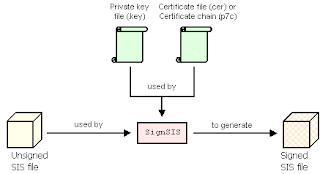
the signing process is:
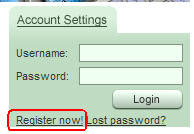
1) Go to here, and register a new account
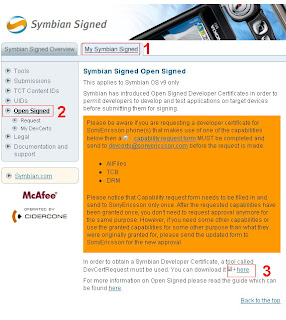
2) Go to My Symbian Signed >>> Open Signed and download DevCertRequest tool.
Direct link:
3) Install the downloaded application (DevCertRequest_2.1.1.exe) in your PC and download the private keyfile (sultan.key in here)

4) It's time to create the certification request: open the DevCertRequest application you just installed and fill in the fields like this:
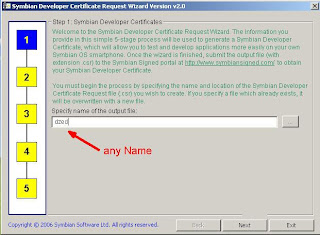
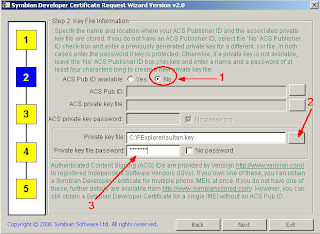

Use the key you just downloaded ( sultan.key ).
Private keyfile password: 0123456

5) Go ahead to next steps and follow examples shown below:
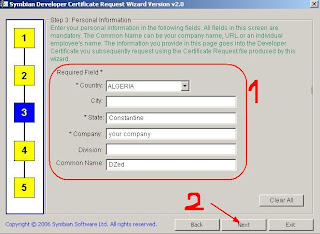
6) Insert your IMEI no. (IMEI of your phone can be obtain with *#06#) and add all application capabilities:
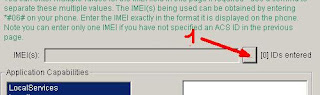
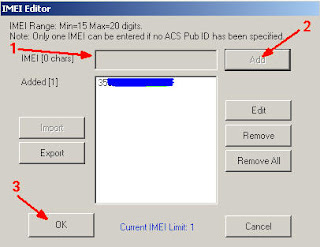
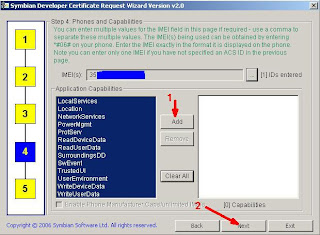


) Insert your IMEI no. (IMEI of your phone can be obtain with *#06#) and add all application capabilities:
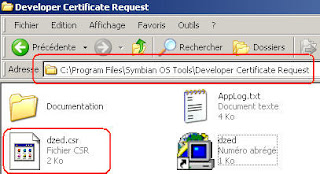
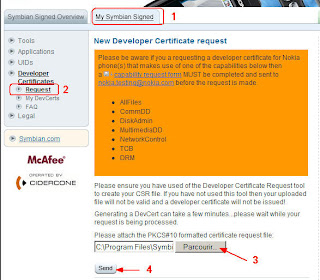
8 ) Go back to Symbian Signed website and go to My Symbian Signed >>> Developer Certificates >>> Request
direct link: https://www.symbiansigned.com/app/barclayhtml/devcert/requestupload.jsp

and upload the Certificate Request file you just created
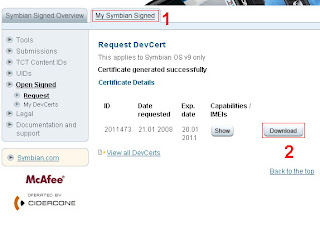
9) Go to My Symbian Signed >>> Developer Certificates >>> My DevCert
direct link: https://www.symbiansigned.com/app/page/devcert/certListdownload

and download your certificate

10) Create a folder and place in FExplorer.sis, the certificate you downloaded from Symbian Signed website, Private Keyfile (sultan.key) and signsis.exe and auto_signsis.bat (you can find it in the archive attached above)


11) Open auto_signsis.bat with notepad

Code:
signsis nokiaApplicatio.sis nokiaApplicatio_signed.sis xxxxxx.cer sultan.key 0123456


(xxxxxx.cer is the certificate you created, and downloaded from Symbian Signed web site change it with yours)

- save auto_signsis.bat (do not use Save-As just Save)

12) double click on auto_signsis.bat This will create a new file called Application_signed.sis , install it and enjoy this great App